
Mauritius All-in-One Travel Form (2026): Official Link & Step-by-Step Guide
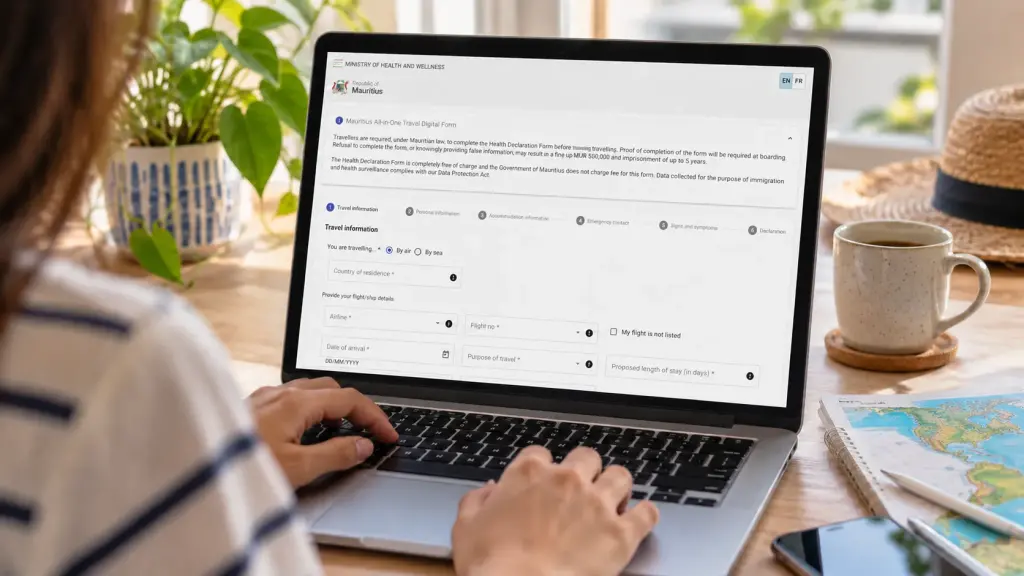
If you’re travelling to Mauritius in 2026, there’s an online form you need to complete before boarding your flight. It’s called the Mauritius All-in-One Travel Form, and the good news is that it’s completely free. The less reassuring part is that fake websites have been appearing in search results, charging travellers for something the Mauritian government provides at no cost.
Airports of Mauritius issued a public warning about these websites in June 2025. The rules have also changed since then. Under public health measures introduced in June 2026, passengers travelling to Mauritius by air must complete the prescribed All-in-One Health Declaration Form before boarding. If you’re getting ready for a holiday, visiting family or returning home, it’s worth sorting this out before heading to the airport.
Official Mauritius All-in-One Travel Form link
The only official government website for completing the Mauritius All-in-One Travel Form is:
https://safemauritius.govmu.org/
The website is operated under the Mauritian government’s domain and is linked directly from the official Airports of Mauritius website. You can complete the form yourself using a phone, laptop or computer. There is no registration fee, processing fee or charge to download the completed document.
| Official website | safemauritius.govmu.org |
| Cost | Free |
| When to complete | Before boarding your flight to Mauritius |
| Who needs it | All arriving air passengers, including children |
| What you receive | A completed PDF with a QR code |
| What to bring | The PDF and QR code, preferably with a printed copy |
Important: If a website asks you to pay for the form, enter your bank card details or purchase an express processing service, do not proceed. The official form is free from beginning to end.
What is the Mauritius All-in-One Travel Form?
The Mauritius All-in-One Travel Digital Form collects information needed for immigration and public health checks when passengers enter Mauritius. It asks for details about your journey, passport, accommodation and recent travel history, followed by health-related questions and a declaration. Once completed, the system produces a PDF document containing a QR code for airport officials to check.
The system was originally introduced in December 2021 to simplify arrival procedures and replace earlier paper-based health forms. It is still used today, although the requirements surrounding it have changed. In June 2026, Mauritius introduced mandatory pre-boarding health declaration measures as part of its response to regional public health concerns. The Mauritius airport travel advisory confirms that passengers must present the prescribed All-in-One Health Declaration Form before boarding flights to Mauritius.
One point worth understanding is that the travel form is not a visa. Completing it does not automatically give you permission to enter Mauritius or determine how long you can stay. Visa requirements depend on your nationality and the purpose of your visit. Our separate guide to Mauritius visa requirements for tourists explains the entry documents you should check before travelling.
What details do you need before filling in the form?
Have your passport, flight booking and accommodation confirmation nearby before opening the website. The form asks for several details that are easy to mistype if you’re switching between booking emails or trying to remember an address. You’ll also need information about your recent travel history and an emergency contact.
- Your passport and personal identification details.
- Your country of residence and nationality.
- Your airline, flight number and arrival date in Mauritius.
- The purpose and expected length of your visit.
- Your initial port of embarkation and countries visited during the previous six months.
- The name and address of your hotel, villa or other accommodation in Mauritius.
- Emergency contact information and accurate answers to the health declaration.
If you’re staying in a holiday rental rather than a hotel, keep the full property address available. For visitors staying with relatives or friends, have the residential address and relevant contact details ready. It’s also sensible to have your return or onward booking nearby, even though that is a separate immigration requirement.
How to fill in the Mauritius All-in-One Travel Form: Step by step
The government portal divides the application into sections covering travel information, personal details, accommodation, emergency contacts, health symptoms and the final declaration. The layout may change as the government updates the system, but the information you need to provide remains broadly the same.
Step 1: Open the official government website
Go directly to safemauritius.govmu.org. Check the address bar carefully before entering anything. The official domain ends in govmu.org, and the connection should use HTTPS. Avoid opening unfamiliar sponsored search results simply because they appear above the government website.
The form offers English and French language options. Select the language you’re most comfortable using and begin with the travel information section.
Step 2: Enter your flight and travel information
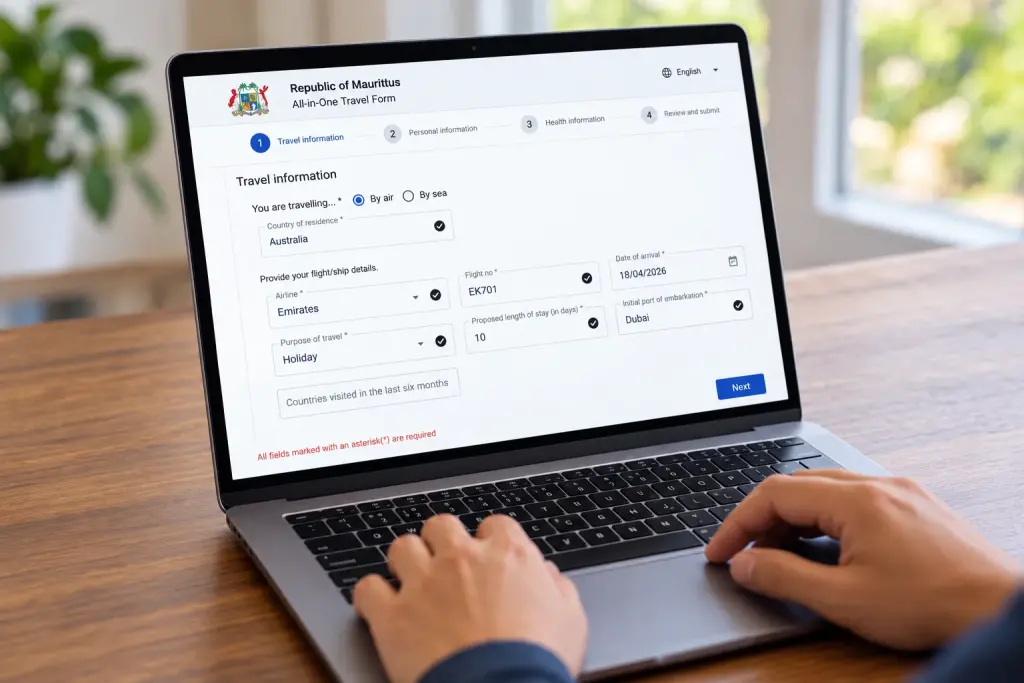
For passengers arriving by plane, select “By air” and enter your country of residence. You will then be asked for your airline, flight number, date of arrival, purpose of travel and proposed length of stay in days. The portal also asks for your initial port of embarkation and countries visited during the previous six months.
Pay particular attention to the arrival date. The government form uses the DD/MM/YYYY format, so 07/11/2026 means 7 November 2026, not 11 July. If you’re taking an overnight flight, check the date you actually land in Mauritius rather than the date you leave home.
For connecting flights, check the flight number of the aircraft that will arrive at Sir Seewoosagur Ramgoolam International Airport (MRU). For example, someone travelling from London through Dubai will have more than one flight number. Use the relevant arriving flight where the form asks for your flight number, and provide your original point of embarkation where requested. The website also has a “My flight is not listed” option if your flight does not appear in the available selection.
Step 3: Fill in your personal and passport details
Enter the personal information requested, using your passport as the reference. This includes identifying details such as your name, date of birth, nationality and passport information. Copy the spelling directly from your travel document and check the passport number carefully before continuing.
It’s easy to overlook a small typing mistake when completing a form on a phone. Pay attention to similar-looking characters in passport numbers and make sure the details agree with the passport you will use for the journey. If you’re travelling as a family, remember that the declaration requirement also applies to children. Make sure every passenger is covered by a completed declaration, using individual entries where the portal requires them.
Step 4: Add your accommodation details in Mauritius
The next section asks where you will be staying during your visit. Enter the name and address of your accommodation using the information supplied by the hotel, holiday rental provider or person hosting you. If you’re spending your first night near the airport before moving to another part of the island, have your first accommodation booking ready and follow the form’s instructions for the address of stay.
If you haven’t yet booked somewhere to stay, it’s worth settling that before completing the form. Our guide to the best areas to stay in Mauritius compares the different parts of the island, while our hotels near Mauritius Airport guide is useful for late arrivals and early departures.
Step 5: Provide your emergency contact information
Complete the emergency contact section with accurate details for someone who can be reached if necessary. Check the telephone number and international dialling code. An emergency contact at home is often a practical choice, particularly if you’re travelling alone, although you should follow the specific fields and instructions shown on the form.
Step 6: Answer the health questions
The form includes a section about signs, symptoms and health-related information. Read each question carefully and answer truthfully. Your recent travel history matters here too, particularly under the public health controls introduced in 2026.
Mauritius has maintained specific travel restrictions and screening arrangements relating to travellers who have recently been in the Democratic Republic of the Congo, Uganda or South Sudan. These can affect eligibility to board and enter the country, depending on citizenship, permits and recent travel history. If your itinerary involves any of these countries, including transit, check the latest official airport health advisory and speak with your airline before departure.
Step 7: Review the declaration and submit
Before submitting, review the information you have entered, especially your passport number, arrival date, flight number and accommodation address. The final declaration confirms the accuracy of the information provided. Submitting false health or travel information can have legal consequences under Mauritian law, so take a moment to check everything rather than rushing through the last screen.
Once the submission is completed successfully, the system generates a PDF containing your travel declaration and QR code. This is the document you need to keep for your journey.
How to download and use your Mauritius travel form QR code
The QR code is generated by the official system after you complete the declaration. You do not need to buy a code, apply for it through another website or install a separate QR code generator. The code is part of the completed PDF and allows airport officials to access or verify the relevant declaration information.
After submitting the form, download and save the PDF to your phone or computer. Open the saved file to make sure the QR code is visible and the document is readable. Ideally, keep a copy somewhere you can access without internet, such as your phone’s downloaded files. A screenshot can be useful as an additional backup, but keep the original PDF too.
The Mauritius airport arrival instructions indicate that the QR code can be presented on a mobile device or in printed form. However, Airports of Mauritius also advises passengers to print a hard copy of the completed document. The safest approach is to carry both. A printed form is especially handy if your phone battery runs out or you have trouble opening the file after landing.
Where will you show the QR code?
Keep the completed form available from the time you check in for your flight. Under the 2026 requirements, airlines may need to verify that passengers have completed the declaration before boarding. When you arrive at SSR International Airport in Mauritius, follow the signs and instructions for immigration and health clearance. Airport guidance specifically asks arriving passengers to present their QR code and passport at the health counter, and officials may also request the document during immigration checks.
You can then continue through the usual arrival process, including passport control, baggage collection and customs. Keep your hotel address and return or onward ticket accessible as immigration officers may ask for these separately.
Warning: Fake Mauritius travel form websites are charging travellers
On 20 June 2025, Airports of Mauritius published an official warning about fraudulent websites impersonating the Travel All-in-One platform. According to the notice, some of these websites closely resemble the legitimate government system and attempt to collect travellers’ personal information. Others demand payment for completing the free declaration, sometimes claiming they can provide faster processing.
The problem is that these websites can look convincing. They may use familiar words such as “Mauritius travel”, “arrival declaration” or “safe travel”, and some may appear prominently in search results. A professional-looking website or a padlock symbol in your browser does not, by itself, establish that a service is operated by the government.
Airports of Mauritius has made its position clear: the official travel declaration costs nothing, and the government does not endorse third-party websites offering paid processing services. You can read the original Airports of Mauritius scam warning.
How to avoid a fake website
- Type safemauritius.govmu.org directly into your browser instead of relying on advertisements or search results.
- Check the full website address before entering passport information. A similar-looking domain is not necessarily official.
- Never provide credit card information to obtain the free travel form.
- Be suspicious of websites promising priority approval or faster QR code processing for a fee.
- If you’re uncertain about a website, follow the government portal link published on the official Airports of Mauritius website.
If you’ve already entered payment information on a suspicious website, contact your bank or card issuer promptly and explain what happened. If you also shared passport information, keep a record of the website and report the incident to the appropriate authorities. Avoid returning to the suspicious website to enter more information or request a refund using additional card details.
Common mistakes when filling in the Mauritius travel form
Most of the form is straightforward, but a few details deserve extra attention. These are the mistakes worth checking before you submit.
- Using the wrong arrival date. This is particularly easy with overnight flights or when switching between date formats. Enter the date you arrive in Mauritius.
- Entering the wrong flight number. If you’re connecting through another airport, check the number of the flight arriving in Mauritius.
- Typing passport details incorrectly. Review names, identification numbers and other details against the passport itself.
- Leaving out recent travel history. The form asks about countries visited during the previous six months. Complete this section carefully and check any current health restrictions that affect your itinerary.
- Providing an incomplete accommodation address. Keep your reservation confirmation handy so you can give the information requested.
- Forgetting children. The airport operator confirms that the declaration requirement includes minors. Check every family member’s documentation before travelling.
- Submitting the form but not saving the PDF. Make sure you can actually open the completed document and display its QR code when needed.
Another practical point: if your flight details or travel plans change after you’ve submitted the form, check whether the information in your declaration still matches your journey. Follow the official portal’s available instructions for correcting or completing a new declaration if necessary. Do not manually alter the generated PDF or assume a document with outdated travel information will be accepted.
What happens if you forget to complete the form?
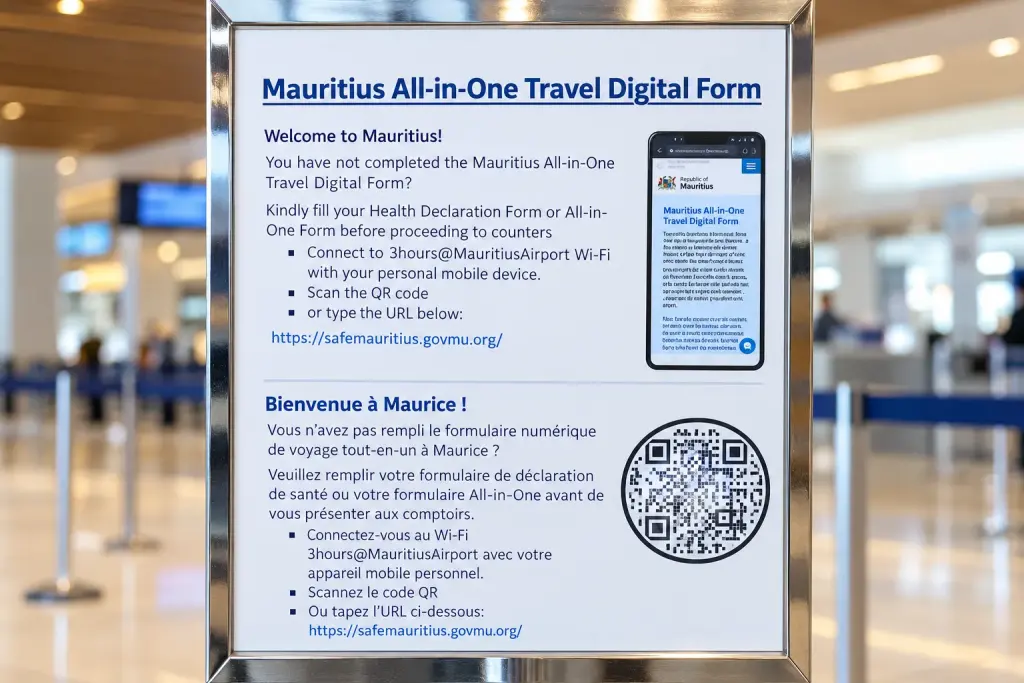
If you arrive in Mauritius without a completed All-in-One Travel Form, you may still see instructions at the airport explaining how to fill it in before proceeding to the immigration and health counters. In fact, the airport has displayed notices specifically for passengers who haven’t completed their declaration, with a QR code linking to the official government website.
The instructions displayed at the airport are straightforward. Connect your phone to the free airport Wi-Fi network, 3Hours@MauritiusAirport, scan the QR code on the notice or visit safemauritius.govmu.org, and complete the form before continuing to the counters.
However, there’s an important change for travellers in 2026. Since 8 June 2026, Mauritius has required passengers to complete and present the prescribed All-in-One Health Declaration Form before boarding their flight.
If you realise you’ve forgotten the form while you’re still at your departure airport, complete it immediately using the official website and follow your airline’s instructions. If you’ve already arrived in Mauritius without a usable QR code, speak to airport staff and follow their directions. Although facilities for completing the form have been provided at the airport, the safest approach is to finish it before travelling and keep a copy of the generated PDF on your phone.
A final document check before flying to Mauritius
The All-in-One Travel Form is only one part of the entry process. Depending on your nationality and travel circumstances, you may also need a visa or permit, proof of accommodation, a return or onward ticket and evidence that you can support yourself financially during your stay. The official airport arrival guide explains the travel documents that visitors should have ready.
Before leaving for the airport, check that you have the correct passport, the completed form and its QR code, any required visa or residence documentation, and your accommodation details. Keep digital copies somewhere accessible without mobile data. If you’re relying on your phone, our guide to eSIM options for Mauritius explains your mobile connectivity choices, although you should still save your travel documents offline.
It’s also worth checking the latest official travel advisories shortly before departure, especially if your journey includes transit through another country. For most travellers, the easiest approach is to complete the government form after confirming their flights and accommodation, save the PDF, print a copy and keep everything with their passport until they have cleared arrival formalities in Mauritius.
Information checked on 30 October 2026 against the Mauritius government travel portal, Airports of Mauritius, Airport Terminal Operations Ltd and the Passport and Immigration Office. Entry and public health requirements can change, so always check official notices before travelling.
Tours and activities in Mauritius
Hand-picked from GetYourGuide. Free cancellation on most bookings.
Some links on this page are affiliate links. If you book through them we may earn a small commission, at no extra cost to you. It helps keep Creole Mauritius free.


Questions and tips